How to Lock Down a Group Hangout Date Entirely Inside iMessage
Sequence polls, confirmations, and venue to finalize plans in iMessage.
To schedule a group hangout inside iMessage, close one decision at a time using a date poll, explicit confirmations, a venue choice, calendar details, and a scheduled reminder. An in-chat AI assistant such as Pencil can help people share when they are free without showing private calendar details. The governing rule is sequencing, although native calendar creation still has limits that prevent an entirely in-thread workflow for every user.
Why group hangout plans die inside the thread before they ever become real
A group chat gives everyone visibility without assigning anyone responsibility. “When is everyone free?” asks each person to scan their calendar and compose an answer, while leaving the next move to somebody else. Responses are easy to postpone and forget. If venue suggestions and transport questions arrive before a date is settled, the thread becomes several unresolved decisions competing for attention.
The group needs a commitment mechanism. A casual yes does not create an event, an attendee list, or a deadline for deciding. Over time, that ambiguity can become friendship drift, where a connection fades without anyone choosing to end it. iMessage now has enough built-in coordination tools to address much of this problem, provided the organizer uses them in the right sequence.
What iMessage actually offers for coordination in iOS 26 and beyond
Apple Intelligence requires iPhone 15 Pro or newer, so unsupported hardware cannot use its assistance. Native polls are a separate iOS 26 feature. They let people propose options in a group chat, collect votes, and see results update in real time. On supported devices with Apple Intelligence enabled, conversation context can also prompt a poll suggestion above the keyboard. Polls work only in blue-bubble iMessage conversations.
Send Later, available since iOS 18, handles another part of coordination. It schedules messages up to 14 days ahead in personal and group iMessage conversations, with Apple’s servers handling delivery even when the phone is offline or off. Recurring scheduled messages are not supported natively. Other iOS 26 improvements include group typing indicators, Apple Cash in US group chats, and an Add to Contacts button beside unknown numbers in the participant list.
Calendar assistance needs a more careful distinction. Apple’s Apple Intelligence page says suggestions in Messages conversations will come in a future software update, but the suggestions shown cover only reminders and notes. Apple Support describes natural-language event creation in Calendar for iOS 27, which was fully released in September 2026. That is not the same as creating an event from a Messages suggestion. Threaded replies, available since iOS 15, let people keep confirmations and side discussions tied to the message they are replying to.
Before you send the first message: the sequencing discipline that makes everything else work
The organizer’s job is to close decisions. Lock the date first, the venue second, and logistics such as cost, transport, and dietary needs afterward. Each stage needs a clear stopping point. Two or three clear choices give people a question they can answer, while talking about venues before the date is set starts a debate before anyone has committed to going. This method fits roughly four to eight people, where everyone knows everyone and agreement remains manageable without formal event administration.
Step 1: Float a date with a poll, not a question
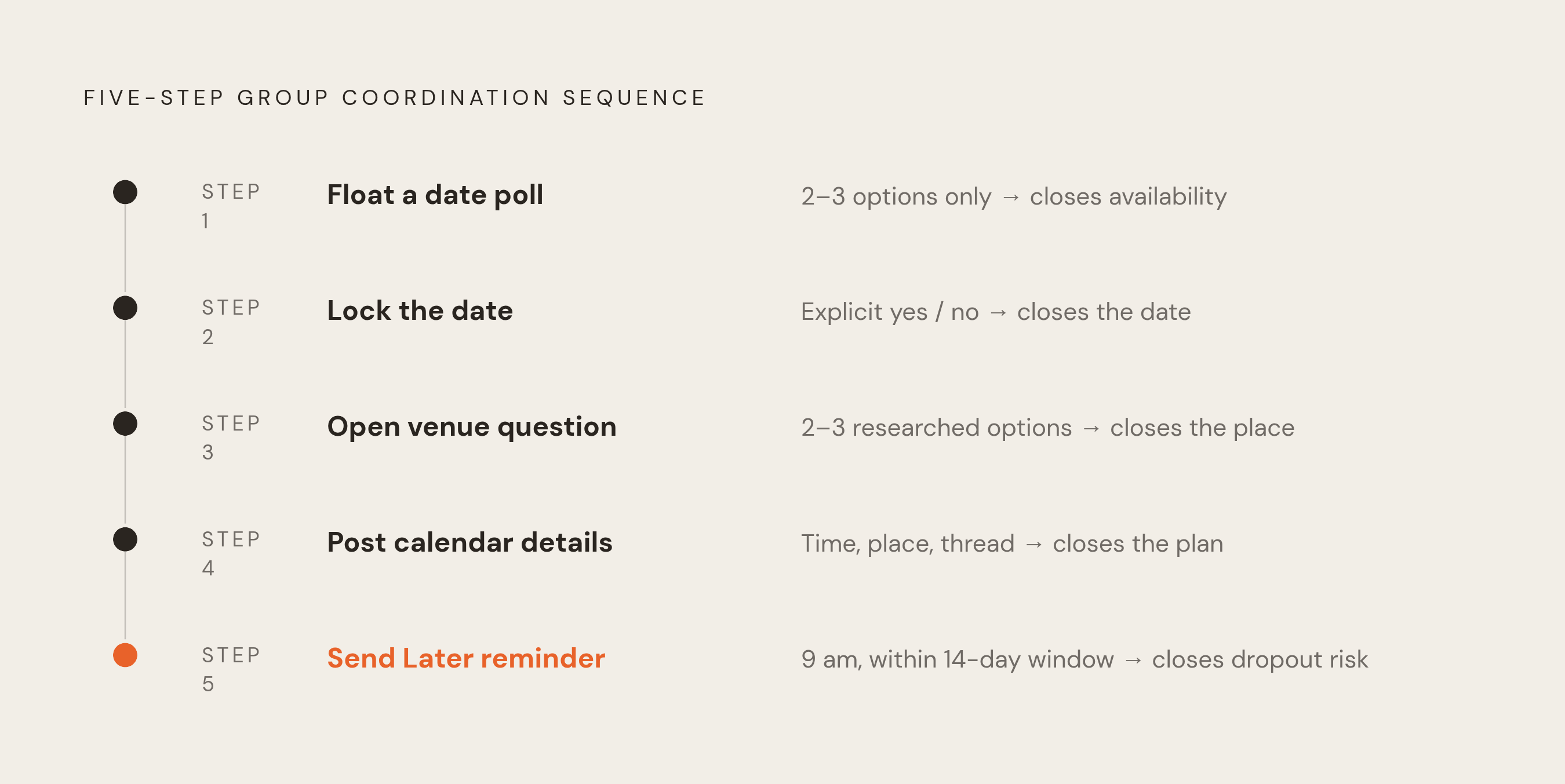
Begin with a warm sentence that signals intent, such as “Trying to actually make this happen — quick vote.” Then open the group chat, tap the plus button in the bottom-left, and select Poll. Use the prompt “Which weekend works for everyone?” with “Saturday the 15th” and “Sunday the 16th” as the options. Nobody needs to write out their whole calendar.
Keep the choice to two or three dates. Five options expand the decision instead of helping close it, and the organizer still has to interpret the result. For non-Apple participants, send a separate text naming the same options and ask for a reply with their pick. Their answers require a manual tally because green-bubble participants cannot see or interact with the native poll.
Step 2: Lock the date out loud and make the group say yes
A winning poll option is not a booking. Once the result is clear, declare the date in the thread with “Saturday the 15th it is — who’s in?” If the group has more than four people, explicitly tag each person so the request has named recipients. Ask for “in” or “out”. iMessage has no native formal RSVP mechanism, so this declaration creates the commitment checkpoint manually.
Asking friends for an explicit answer can feel slightly awkward. A public answer makes attendance more definite than a passing “yeah sounds good,” without turning the outing into an attendance exercise. Replies in-thread to the declaration keep the count readable. To start a threaded reply, swipe left on the message and tap Reply in Thread.
Count a maybe as someone who has yet to say yes. Accept that the person is unsure, give them a deadline such as Thursday, and move ahead without waiting forever. This separates confirmed attendance from unresolved availability. It also prevents one uncertain response from reopening the date for everyone who has committed.
Step 3: Open the venue question only after the date is closed
With the date and attendee list settled, propose two or three researched venue options. Keep this second decision just as bounded. A venue poll can ask “Which place for Saturday the 15th?” and pair each actual venue name with its most useful distinction, such as price range, neighborhood, or reservation requirement. Keep the venue discussion in a separate threaded reply off the date-lock message so everyone can easily follow what has been decided. When the choice is settled, post one declaration naming the place, date, time, and plan to book.
Step 4: Get the calendar invite out without leaving the thread
A calendar event gives the agreement a durable home. It needs the time, location, and right people on the invitation, which is the step Text Pencil, an AI bot added to iMessage group chats that helps a group settle on a time and sends the calendar invite, is meant to handle. This is also where the promise of staying entirely inside iMessage needs qualification. Native polls and confirmations work in the conversation, but a released one-tap Messages-to-Calendar suggestion is not established by the available feature information. The software sets this limit, so the organizer is not at fault.
On supported hardware, iOS 27 allows an event to be described in natural language in Calendar, which fills in the title, time, location, and invitees. For users without Apple Intelligence, the fallback is manual Calendar entry or asking Siri to create the event from its details. Neither fallback should be presented as the promised Messages calendar suggestion.
An in-chat AI assistant offers a complementary approach. Pencil supports availability sharing without sharing private calendar details, making it relevant when the group needs help identifying a workable time inside the conversation. Availability is the useful information. That role should be distinguished from a guarantee that an assistant will create and distribute every calendar invitation automatically, which the available details do not establish.
However the calendar event is made, post the final details back into iMessage as plain text. Include the date, time, place, and agreed logistics. Everyone should be able to retrieve the plan without opening Calendar or reconstructing the venue debate. This summary also gives the reminder a settled set of details to repeat later. The calendar event and the thread serve different purposes, so neither replaces the other.
Step 5: Schedule the day-of reminder at the moment of booking, not the morning it's due
The final nudge should not depend on future memory. Once the booking is settled, write “Looking forward to tonight — see you at 7 at [venue]” and schedule it for 9am on the day of the event. In the group chat, compose the message, hold the send button, select Send Later, choose the date and time, and confirm. The event must be within the 14-day scheduling window. Apple’s servers then handle delivery even if the organizer’s phone is off.
Keep the message warm. A forward-looking reminder signals that someone is going and invites reciprocal confirmation from people whose attention has moved elsewhere. It can do this without asking everyone to answer again or making them feel guilty. With the choices already made, the organizer has nothing new to sort out with the group that morning. The invitation can return to being something people look forward to.
Where this workflow hits its limits and what to do at each edge
Polls and Send Later do not work in SMS/MMS threads, so manually tallying text replies replaces only the voting step. iMessage has end-to-end encryption and SMS/MMS does not, which matters especially when people share home addresses or financial details about the outing. A mixed group should not be treated as equivalent to an all-iMessage conversation.
Older hardware also changes the calendar route. People without Apple Intelligence need Siri or must enter the event in Calendar by hand, and even those with supported devices should not assume they can use Messages calendar suggestions. Apple Intelligence does not autonomously protect time or reorganize the day when plans change. Its role is assistance followed by human confirmation. The organizer still owns the decision to settle the plan and communicate it.
Scale and group membership create separate limits. iMessage groups have a relatively small participant limit, and carrier SMS groups have a lower one, so this method is not designed for event-scale organizing. The native Leave This Conversation option is available only in all-iMessage groups with four or more participants. People in smaller or mixed groups cannot leave this way, and deleting a conversation only removes the copy on their device without letting them leave the group. For a small friend group on supported iPhones in an all-iMessage thread, the core coordination sequence avoids these mixed-device and scale problems.
Turning a one-off into a recurring plan so the thread doesn't go cold again
The best moment to arrange the next hangout is during or immediately after the current one. Momentum is already present, and nobody has to revive a dormant conversation. Post “That was great. Same thing next month?” while that goodwill is fresh, then repeat the short sequence of a date poll, a declaration, and a calendar note. The invitation builds on something that actually happened. Waiting until the thread goes quiet recreates the original coordination burden.
A predictable recurring plan removes more of that burden. A dinner on the second Saturday of the month or a standing Sunday walk changes the question from finding a date to confirming who can attend. One cancellation need not cancel the gathering. Send Later can send one-off reminders within its 14-day window, but it cannot schedule a message three weeks ahead or repeat messages automatically. A recurring social plan and a recurring message are different things.
Pencil can retain context about who usually comes, what time worked previously, and who wanted to join next time. That reduces the need to reconstruct each gathering from old messages. A regular invitation gives friendship a place in the calendar without requiring the whole group to start over each month. Seeing the plan through until people get together is a way to show care.