Pencil and the New Class of iMessage Apps That Actually Close the Loop on Plans
Native Send Later delivers messages, but only a chat-based assistant closes plans.

An AI scheduling assistant inside iMessage group chats, such as Pencil, is designed to turn a proposed hangout into a calendar invite without moving participants out of the conversation. The distinction is between scheduling a message and coordinating a plan. Closing the loop requires availability comparison, agreement, follow-up, and an invite.
Why plans die in the thread before anyone leaves the app
The enthusiasm is familiar, and so is the silence. Someone writes “we should hang,” several people respond warmly, and then nothing happens. Nobody has said no to the idea, but nobody wants to be the person who keeps asking. The thread goes cold before there is a date to decline. Interest was present, but there was no mechanism for turning it into a commitment.
That gap leaves one person absorbing most of the coordination labor. The organizer reads replies, identifies conflicts, proposes alternatives, and decides when another nudge would feel intrusive. For everyone else, the same exchange is a small task now and then, so they see little of how the work adds up. The imbalance grows in larger groups because each new person brings more chances for times to clash. Waiting for a perfect date can then become another reason not to act, even when the group would benefit more from momentum than unanimity.
What "closing the loop" actually means in a group chat
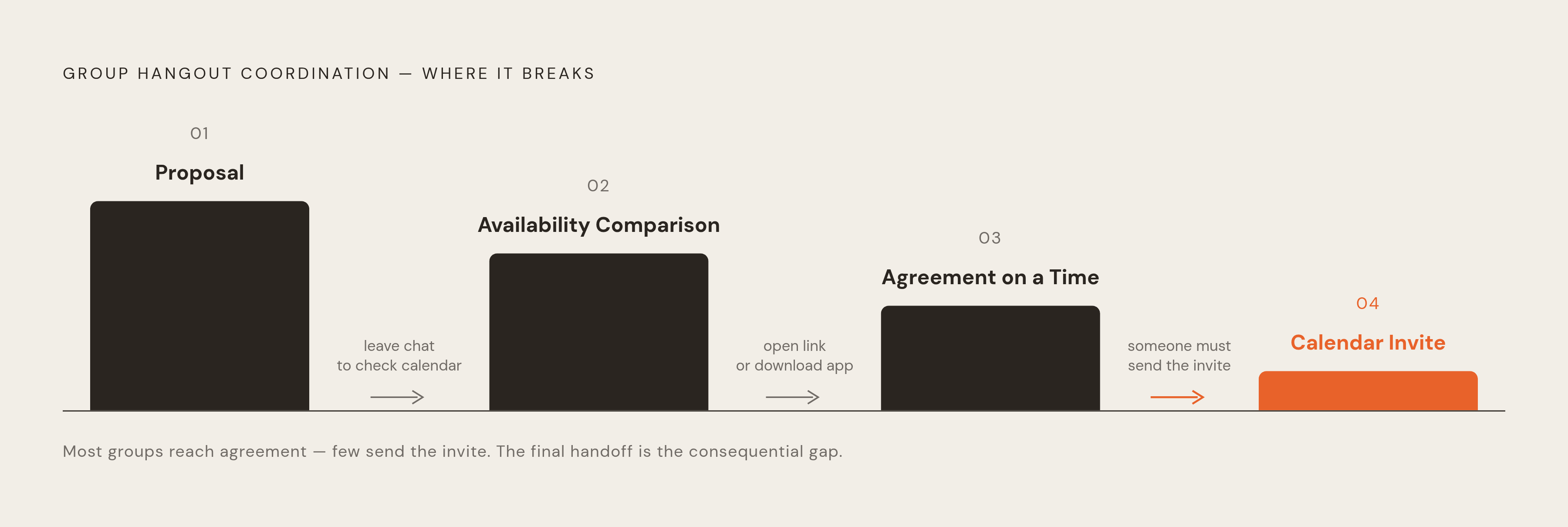
Closing the loop means completing the arc from a first suggestion to a confirmed plan without requiring participants to leave the conversation. That arc has at least four stages, which are a proposal, availability comparison, agreement on a time, and a calendar invite. Each stage has a different completion condition. Enthusiastic replies establish interest, but they do not establish availability, and an agreed time does not itself send an invite.
Every handoff is a point where someone might drop out. A booking link, separate app, or request to open a calendar asks people to leave the exchange and do something elsewhere. Those requests accumulate, so a group that reaches agreement but never sends the invite has stalled late. Cancellation is not necessarily the end of coordination, but silence after cancellation leaves no route to a replacement date.
This definition sets a stricter test than whether a tool can send a reminder. The tool must support the transitions between stages, including the return to availability comparison after a proposed time falls through.
What Apple's native Send Later actually does — and where it stops
Apple’s Send Later in iOS 18 addresses a clear and useful problem. It lets someone prepare an iMessage now for delivery at a later time, separating the moment of composition from the moment of receipt. That works well for a thoughtful message or a reminder that is already written. The sender knows what to say and when it should arrive. The remaining job is delivery.
Its boundaries are specific. Send Later works only with iMessage, so it does not cover recipients using non-Apple devices, and it supports scheduling up to 14 days ahead. It has no support for recurring sends, scheduled audio messages, or scheduled location sharing. Those limits set out which messages it can deliver and leave it able to do the job it was built for.
Send Later delivers a message, but it does not compare availability, collect replies into a decision, or send a calendar invite. A scheduled prompt can ask the group for a date, yet the organizer still has to interpret what comes back. Native scheduling is therefore a thoughtfulness tool.
The third-party scheduling apps that extend delivery but not coordination
Third-party tools broaden the delivery choices beyond Apple’s native feature. Their differences concern platforms, automation, recurrence, and the conditions required for a send to happen. These are substantial distinctions for someone managing outbound messages. They do not, however, change the underlying unit of work. The user still has to supply the message and know what it should do and when it should arrive.
Kyew serves the iPhone niche of iMessage and SMS scheduling through Apple Shortcuts or a reminder, with support for recurring messages. Its scope excludes WhatsApp and email. SKEDit takes a broader platform approach on Android, automating WhatsApp, WhatsApp Business, Telegram, Messenger, Instagram DMs, email, SMS, and phone calls. Its phone must remain on and online at send time. That makes device availability part of the delivery requirement.
Google Messages provides built-in scheduled sending on Android without another app. The phone must be powered on and connected at or after the scheduled time, with delivery occurring when connectivity returns. Telegram instead schedules messages from its servers, allowing the phone to be off, but serves Telegram conversations only. The distinction is operational. None of these delivery models resolves conflicting replies or identifies outstanding responses to a proposed hangout.
Why the coordination gap lives specifically inside the conversation layer
The unresolved work belongs to the conversation because that is where participants express interest, qualify their availability, and negotiate a commitment. A calendar can hold an event once it is agreed, while an outbound scheduler can send a message once it is ready. Neither function alone handles the uncertainty between those states. Coordination requires interpreting replies and responding to what remains unresolved.
Moving it elsewhere also changes the character of the request. A casual exchange in a familiar thread becomes a task in another interface, with a separate demand on attention. The cost is not simply another tap. Participants must resume the planning context somewhere other than the place where it arose, and each departure can cost a response. Keeping the work in the thread cuts down on that handoff instead of just making the other interface easier to use.
There is also an accountability difference between an unresolved proposal left to fade and a visible follow-up inside the group. The follow-up makes the next step clear without leaving the organizer to restart the conversation alone. Against a norm of “protecting your peace,” where opting out can become opting out without notice, that distinction is consequential. The design goal is to prevent cancellation from dissolving into silence.
How an AI assistant schedules a group hangout without leaving iMessage
An iMessage-native AI assistant works on the unfolding exchange. The category’s distinguishing functions include reading the conversation, surfacing availability, identifying unanswered requests, and following up when a proposed time gains no traction. Those functions connect one planning stage to the next. A delivery scheduler waits for instructions about what to send. A conversation-first assistant uses the thread’s context to support the next coordination step.
That approach also differs from professional calendar tools built around focus-time protection and meeting optimization. Those tools start with the calendar as the working environment, while an in-chat assistant starts with the conversation. Availability can then be shared in the exchange without asking people to open a separate calendar app. Putting a scheduling link into a message does not make the workflow conversation-first.
Pencil illustrates the category through availability-sharing rather than disclosure of private event details, editable contact preferences, disableable follow-ups, and an in-chat invite. Contact preferences, including preferred times and recurring commitments, mean people have less need to repeat what limits their availability in each conversation. Follow-ups address a different burden, which is deciding when and how to revive an unanswered request. These controls keep the assistant’s contribution bounded. Its useful role is to advance the plan.
The privacy question every in-chat AI has to answer before it earns a place in the thread
Personal planning threads hold private information, so an assistant needs more than usefulness to earn a place in them. The assistant needs enough information to spot proposed times, missing replies, and commitments that affect when people are free. That need creates a boundary problem. Information that helps determine availability is not automatically information the rest of the group should see. Coordination requires access to a useful answer.
Participants can see when someone is free without being shown what occupies the rest of their calendar. The distinction is observable in the assistant’s behavior, whereas a broad statement about privacy cannot demonstrate how a particular interaction will unfold. It is a specific design choice that can be assessed against what appears in the thread.
Editable contact preferences allow retained information to be corrected, while follow-ups that can be disabled let participants limit intervention. A presence that recedes once the plan reaches the calendar also keeps the role proportionate to the task. Discretion has to survive each interaction. Sharing something once without permission can undo the trust built by helping many times, so the product has to show restraint as part of its job.
How Pencil fits into this generation of in-chat coordination tools
Pencil belongs to this category because its working environment is the group chat itself. Its described flow requires no link to click, no app to download, and no departure from the channel where the plan begins. That removes a handoff at the point of participation. The intended arc extends from “we should hang” through availability comparison and time agreement to a calendar invite.
The combination of functions is important to evaluating that scope. Availability-sharing helps the group decide, contact preferences keep track of what limits people’s time, and follow-ups help when replies stop coming. The invite then gives the agreement a calendar destination. Each function serves a distinct transition.
That description also has clear limits. Pencil does not claim to remember every detail, have access to all guests’ full calendars, keep chats completely separate, or guarantee bookings. In-chat coordination should not be confused with infallibility or unrestricted access. The product’s stated value is a useful, discreet presence in the planning exchange. It should therefore be judged on how well it helps the group decide within those limits, without sharing more or interrupting more than it needs to.
What to actually use depending on what kind of plan you are trying to make
For timing a message, Apple’s native option can send an iMessage within its 14-day window. Scheduled offers an iPhone alternative covering iMessage, SMS, WhatsApp, and email, with Auto-Send for SMS and email and a reminder-then-tap approach for iMessage. It is free to start, with Premium required for Auto-Send. These choices suit a birthday wish, business-hours reminder, or follow-up whose message and delivery time are already decided.
For cross-platform delivery, the recipient’s channel narrows the choice. Scheduled lets iPhone users send across platforms, while Google Messages is the built-in option on Android. SKEDit fits Android users who need WhatsApp scheduling and can meet its device requirements. Telegram’s native scheduler fits Telegram-only conversations. None needs to replace a coordination assistant because each addresses a different part of the workflow.
Recurrence and reminder-only workflows call for another distinction. Kyew fits recurring iMessage and SMS messages on iPhone, while Apple Shortcuts suits people comfortable setting up automation. Moxy Messenger offers a notification-based approach across SMS, iMessage, Apple Mail, Gmail, and WhatsApp. Here, the useful criterion is how much of delivery should happen automatically and how much should remain a prompted action. The plan itself may already be settled.
For an unresolved group hangout, the selection criterion changes. An iMessage-native AI assistant such as Pencil is designed for availability comparison, follow-up, and an invite inside the conversation. That is the appropriate category when the obstacle is getting from interest to agreement without the thread going cold. A promising exchange ends with a date on the calendar.